ZoneControl
ZoneControl is a web-based interface for managing domains on the PowerDNS Authoritative Server.
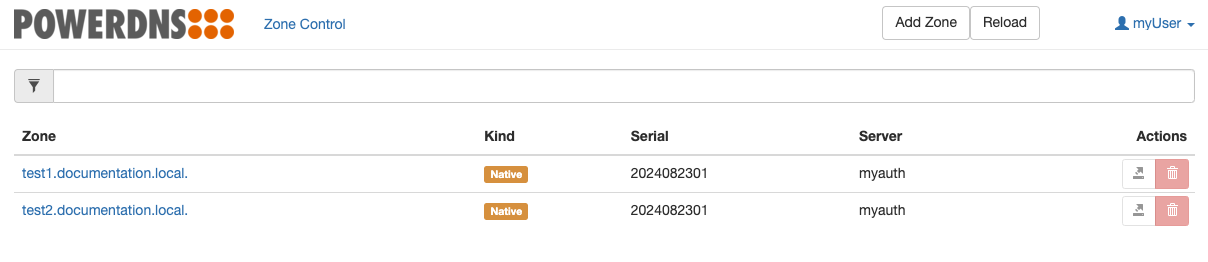
Example of ZoneControl:
Configuration Reference
Instance Sets
Sets of instances of ZoneControl can be defined under the root node zonecontrols. Each instance set should be a key-value pair, with:
- key: Name of the instance set
- value: Dictionary holding the configuration of the instance set
A minimal, yet functional configuration of ZoneControl requires the following:
zonecontrols:
  myzonecontrol:
    postgres:
      <Configuration of a Postgres Database>
    authEndpoints:
      - <Configuration of an Auth endpoint>
The above shown requirements are:
- Postgres: ZoneControl needs access to a database in order for it to function
- Auth Endpoints: ZoneControl connects to Authoritative Server instances via API to manage zones, record sets, etc
Parameters which can be used to configure ZoneControl instances for a specific instance set are shown in the below table.
| Parameter | Type | Default | Description |
|---|---|---|---|
adminUser |
string |
"zcadmin" |
Username of user to create with administrative privileges |
adminPassword |
string |
Password of the user specified by adminUser. Default: generated during deployment |
|
adminSecretName |
string |
Name of an existing Secret holding the desired username and password of a user to be provisioned with administrative privileges | |
adminSecretUserKey |
string |
"admin_user" |
Name of the item within Secret referenced by adminSecretName which holds the username of the admin user |
adminSecretPasswordKey |
string |
"admin_password" |
Name of the item within Secret referenced by adminSecretName which holds the password of the admin user |
affinity |
k8s:Affinity |
Pod affinity (Kubernetes docs: Affinity and anti-affinity). If unset, a default anti-affinity is applied using antiAffinityPreset to spread pods across nodes |
|
agentLogLevel |
string |
"info" |
Verbosity of logging for the agent container. Available options: "debug" "info" "warn" "error" |
agentLogFormat |
string |
"text" |
Format of logging for the agent container. Available options: "text" "json" |
agentResources |
k8s:Resources |
|
Resources allocated to the 'agent' container if resourceDefaults is true |
antiAffinityPreset |
string |
"preferred" |
Pod anti affinity preset. Available options: "preferred" "required" |
auditLogEnabled |
boolean |
false |
If true, enable audit logging |
auditLogJSON |
boolean |
false |
If true, audit logging is output in JSON |
authEndpoints |
List of AuthEndpoints | [] |
List of endpoints of Authoritative Server instance sets |
branding |
Branding | Configuration to customize the appearance of ZoneControl | |
catalogZonesEnabled |
boolean |
true |
If true, enable management of catalog zones in ZoneControl |
config |
multiline string |
"" |
Additional config to be injected into the Django configuration file used by ZoneControl. Contents of config should be formatted as a multiline string, for example: |
containerSecurityContext |
k8s:SecurityContext |
|
SecurityContext applied to each container |
disableSticky |
boolean |
false |
If true, disable the operator-controlled selection of a primary pod to handle all inbound traffic |
historyEnabled |
boolean |
false |
If true, enable version history tracking in the database. When changes are made, version history of the related object is stored and can be restored via the GUI. Note: The scope of version history is limited to this instance set's database. If you have multiple separate ZoneControl instance sets interacting with the same Auth API endpoint, you could end up having multiple sets of conflicting history unless those ZoneControl instance sets share the same database. |
hostNetwork |
boolean |
false |
Use host networking for pods |
ingress |
Ingress | Ingress configuration | |
initResources |
k8s:Resources |
|
Resources allocated to the 'zc-init' container if resourceDefaults is true |
ldapBackend |
string |
Name of a userBackend with type ldap (See: User Backends) |
|
ldapAdminGroup |
string |
DN of an LDAP group whose members will be assigned administrative privileges. Example: cn=staff,ou=groups,dc=example,dc=org |
|
ldapCustomAuthBackendClass |
string |
"CustomBackend" |
Name of the class defined in the custom ldap auth backend. Only used if ldapCustomAuthBackendConfigMap is set |
ldapCustomAuthBackendConfigMap |
string |
ConfigMap containing Python code for a custom ldap auth backend to use in ZoneControl. Using this disables the default django_auth_ldap.backend.LDAPBackend backend |
|
ldapCustomAuthBackendConfigMapKey |
string |
Item in ConfigMap which holds the custom ldap auth backend (default: backend.py). Only used if ldapCustomAuthBackendConfigMap is set |
|
ldapMirrorGroups |
boolean |
true |
Whether or not ZoneControl should synchronize an LDAP user's groups into the ZoneControl user management. This only applies to LDAP users who have successfully logged in and the groups to which they belong. Groups are only synchronized if they belong to one of the group bases and satisfy the optional group base filters |
logLevel |
string |
"info" |
ZoneControl log level. Available options: "debug" "info" "warn" "error" |
minReadySeconds |
integer |
Minimum number of seconds for which a newly created pod should be ready without any of its containers crashing, for it to be considered available. Applies Kubernetes defaults when not set, which is 0 seconds | |
nginxResources |
k8s:Resources |
|
Resources allocated to the 'nginx' container |
nodeSelector |
k8s:NodeSelector |
{} |
Kubernetes pod nodeSelector |
oidcBackend |
string |
Name of a userBackend with type oidc (See: User Backends) |
|
oidcDefaultScopes |
List of string |
|
Default scopes requested from OIDC provider |
oidcDisableFetchUserInfo |
boolean |
false |
If true, do not fetch data from the userinfo endpoint |
oidcEnablePKCE |
boolean |
false |
If true, enable PKCE towards the OIDC provider |
oidcExtraScopes |
List of string |
[] |
Extra scopes requested from OIDC provider |
oidcRolePath |
List of string |
|
Path inside extra_data to fetch roles from. Defaults to groups within the returned userinfo |
oidcRolePrefix |
string |
zc: |
Prefix for ZoneControl roles fetched from OIDC provider |
oidcTokenAuthMethod |
string |
"" |
Token endpoint authentication method, if empty the OIDC connector chooses one from the list proposed by the OIDC provider. Available options: "client_secret_basic" "client_secret_post" |
oidcUIDField |
string |
"sub" |
Field used as ZoneControl user ID |
podAnnotations |
k8s:Annotations |
{} |
Annotations to be added to each pod |
podDisruptionBudget |
k8s:PodDisruptionBudgetSpec |
{} |
Spec of PodDisruptionBudget to be applied to deployment |
podLabels |
k8s:Labels |
{} |
Labels to be added to each pod |
podPreemptionPolicy |
string |
Policy for preempting pods with lower priority | |
podPriorityClassName |
string |
Name of PriorityClass to be assigned to each pod | |
podRuntimeClassName |
string |
Name of RuntimeClass to be assigned to each pod | |
podSchedulerName |
string |
Name of scheduler responsible for dispatching pods | |
podSecurityContext |
k8s:PodSecurityContext |
|
SecurityContext applied to each pod |
podTerminationGracePeriodSeconds |
integer |
Duration after which terminating pods are stopped immediately if they do not exit gracefully | |
postgres |
Postgres | Postgres database configuration | |
progressDeadlineSeconds |
integer |
The maximum time in seconds for a deployment to make progress before it is considered to be failed. Applies Kubernetes defaults when not set, which is 600 seconds | |
redisCacheInterval |
integer |
60 |
Interval in seconds between consecutive updates of zones-lists (default: 60) |
redisCacheTTL |
integer |
300 |
How long in seconds a zones-list is cached before being automatically removed (default: 300) |
redisDatabase |
integer |
0 |
Redis database to connect to for caching. Only used if redisHost is set |
redisHost |
string |
Redis host to connect to for caching | |
redisPassword |
string |
Password to connect to Redis with. Ignored if redisSecretName is set and omitted if not configured |
|
redisPort |
integer |
6379 |
Redis port to connect to for caching. Only used if redisHost is set |
redisScheme |
string |
"redis" |
Redis scheme to connect with for caching. Only used if redisHost is set |
redisSecretName |
string |
Name of a pre-existing secret holding password to connect to Redis with. Has priority over redisPassword |
|
redisSecretPasswordKey |
string |
"password" |
Name of item in redisSecretName Secret containing the password (default: password) |
redisURI |
string |
Redis connect string to enable caching (Must be full connect string, ie: "redis://my.redis.host.local:6379"). Has priority over redisHost |
|
redisUsername |
string |
Username to connect to Redis with. Only used if redisHost is set and rarely required. Most Redis endpoints only require the password to be configured. |
|
replicas |
integer |
2 |
Default number of replicas in a Deployment |
resources |
k8s:Resources |
|
Resources allocated to the 'zonecontrol' container |
service |
Service | |
Service configuration |
serviceLabels |
k8s:Labels |
{} |
Labels to be added to each service |
strategy |
k8s:Strategy |
{} |
Kubernetes Deployment Strategy |
tolerations |
List of k8s:Tolerations |
[] |
Kubernetes pod Tolerations |
topologySpreadConstraints |
List of k8s:TopologySpreadConstraint |
[] |
Kubernetes pod topology spread constraints |
Auth Endpoints
There are 3 ways to configure endpoints of Authoritative instances in ZoneControl:
- URL + Static API key
- URL + API key from Secret
- Learned from a set of Auth instances part of the same Userplane deployment
URL + Static API Key
To configure an Auth endpoint with a static URL and a static API key:
zonecontrols:
  myzc:
    postgres:
      <database config here>
    authEndpoints:
      - name: myendpoint
        url: http://url.of.auth:8080
        key: "SomeAPIKey"
Note: url must specify a protocol (either http:// or https://)
URL + API Key from secret
To configure an Auth endpoint with a static URL and an API key from a secret:
zonecontrols:
  myzc:
    postgres:
      <database config here>
    authEndpoints:
      - name: myendpoint
        url: http://url.of.auth:8080
        keySecret: some-secret
        keySecretItem: "api_key"
Where api_key is the name of the data item within the some-secret secret which holds the API key.
Note: url must specify a protocol (either http:// or https://)
Learned from set of Auth instances
To configure an Auth endpoint learned automatically from a set of Auth instances:
auths:
  testauth:
    <Auth configuration>

zonecontrols:
  myzc:
    postgres:
      <database config here>
    authEndpoints:
      - name: myendpoint
        auth: testauth
Branding
Parameters to configure the appearance of ZoneControl. For example, to change the logo using a URL:
Alternatively, you can configure a logo to be taken from a ConfigMap:
zonecontrols:
  myzonecontrol:
    branding:
      logoConfigMap: my-logo-configmap
      logoConfigMapKey: "logo_name.gif"
You can further configure the appearance using the following parameters::
| Parameter | Type | Default | Description |
|---|---|---|---|
logoConfigMap |
string |
Name of the configmap containing the logo | |
logoConfigMapKey |
string |
"logo.svg" |
Name of the item inside the configmap containing the logo |
logoURL |
string |
URL of a logo. This should be accessible by anyone interacting with the ZoneControl GUI |
Ingress
Parameters to configure an Ingress for ZoneControl. For example:
zonecontrols:
  myzonecontrol:
    ingress:
      enabled: true
      ingressClassName: "nginx"
      hosts:
        - zc.example.local
| Parameter | Type | Default | Description |
|---|---|---|---|
annotations |
k8s:Annotations |
{} |
Annotations for the ingress |
enabled |
boolean |
false |
If true, create an ingress object |
hosts |
List of string |
[] |
List of hosts for which the ingress should accept traffic (If using tls, this should also include the hosts listed on the tls object) |
ingressClassName |
string |
Name of the ingress class | |
tls |
List of AuthAPIIngressTLS | [] |
List of ingress tls configurations |
Ingress TLS
Parameters to configure TLS for an ingress. For example:
zonecontrols:
  myzonecontrol:
    ingress:
      enabled: true
      ingressClassName: "nginx"
      hosts:
        - zc.example.local
      tls:
        - secretName: zc-ingress-cert
          hosts:
          - zc.example.local
The above example will result in an ingress for ZoneControl listening for zc.example.local and serving the certificate contained in the secret zc-ingress-cert.
Note: tls is a list of configurations. Below shows the parameters which can be used for each entry in that list:
| Parameter | Type | Default | Description |
|---|---|---|---|
hosts |
List of string |
[] |
List of hosts for which the ingress should accept TLS traffic |
secretName |
string |
"" |
Name of a secret containing the certificate to be used for this ingress |
OIDC Configuration
OIDC can be enabled by setting the oidcBackend parameter to a OIDC User Backend.
Scopes
The default behaviour is for ZoneControl to request the following scopes from the OIDC provider:
openidemailprofile
This list is controlled by the oidcDefaultScopes list. Additional scopes can be configured by adding to the oidcExtraScopes list. If you wish to remove one or more of the default scopes you can overwrite the oidcDefaultScopes entirely.
Example to add the scope roles:
Roles
By default, ZoneControl has the following roles available when OIDC is enabled:
| ZoneControl Role Name | Internal Role Name | Default Prefixed OIDC Role Name |
|---|---|---|
oauth_default_readonly |
readonly |
zc:readonly |
oauth_default_add_zones |
add_zones |
zc:add_zones |
oauth_default_delete_zones |
delete_zones |
zc:delete_zones |
oauth_default_change_settings |
change_settings |
zc:change_settings |
oauth_default_change_dnssec |
change_dnssec |
zc:change_dnssec |
oauth_default_advanced_dnssec |
advanced_dnssec |
zc:advanced_dnssec |
oauth_default_restore_version |
restore_version |
zc:restore_version |
oauth_default_all_permissions |
all_permissions |
zc:all_permissions |
The different columns explained:
ZoneControl Role Name: Name of the role as observed in the ZoneControl admin GUI (Internal Role Name, prefixed byoauth_default)Internal Role Name: Internal name of the roleDefault Prefixed OIDC Role Name: Name of the role as expected to be returned by the OIDC provider (Internal Role Name, prefixed by value ofoidcRolePrefix)
This means that if the OIDC provider returns userinfo which contains zc:all_permissions in the correct item, the role visible as oauth_default_all_permissions in the ZoneControl admin GUI will be assigned to that user in ZoneControl. If you wish to have a different prefix used in OIDC, you can change the default zc: prefix to any other value by configuring oidcRolePrefix.
By default, ZoneControl looks inside the data returned by the OIDC endpoint to fetch the role(s) from the item at the path configured in oidcRolePath (groups inside userinfo).
With the defaults, this means ZoneControl will look for an item groups for the roles within the userinfo. This is the default behaviour of Authentik when you use groups to provide access to users, but differs per OIDC provider.
Example: Scope & Roles
Assume we have an OIDC provider configured as follows:
- Custom scope
zcrolesto allow ZoneControl to request role assignments - Custom scope mapping to return a user's roles in the
userinfo.zonecontrol.rolesitem when the scopezcrolesis requested - Roles returned by the OIDC provider are prefixed with
zcrole_, for example:zcrole_all_permissions
We can then configure ZoneControl as follows:
zonecontrols:
  myzonecontrol:
    oidcBackend: myoidcconfig
    oidcExtraScopes:
      - "zcroles"
    oidcRolePath:
      - "userinfo"
      - "zonecontrol"
      - "roles"
    oidcRolePrefix: "zcrole_"
Note the format of the oidcRolePath, this is a top-to-bottom traversal of the extra_data object based on the items in this list.
Postgres
If you have an existing Postgres database available, you can configure ZoneControl to use it as follows:
zonecontrols:
  myzonecontrol:
    postgres:
      host: host-of-postgres-cluster
      dbname: name-of-db
      user: some_user
      password: some_user_password
You can further configure the Postgres connection using the following parameters::
| Parameter | Type | Required | Default | Description |
|---|---|---|---|---|
dbname |
string |
yes |
Name of the database | |
host |
string |
yes |
Host/IP of the Postgres endpoint | |
password |
string |
Password to use for authentication. Using secretName is preferred |
||
port |
integer |
5432 |
Port over which to access the Postgres endpoint | |
secretName |
string |
Name of a pre-existing Kubernetes Secret containing a username & password for authentication | ||
secretPasswordKey |
string |
"password" |
If secretName is specified: name of the item inside the Secret which holds the password |
|
secretUsernameKey |
string |
"username" |
If secretName is specified: name of the item inside the Secret which holds the username |
|
sslmode |
string |
Postgres sslmode to use while connecting. Optional, omitted if no value is provided |
||
user |
string |
Username to use for authentication. Using secretName is preferred |
If you do not have a Postgres database available but you deployed the powerdns-operators Helm Chart, you can request the Postgres operator to create and manage one for you:
powerdns-operators
The powerdns-operators Helm Chart was originally made available to help easily deploy Postgres databases for use by ZoneControl. You can still use it for this purpose, but we highly recommend using a self-managed database for ZoneControl.
Service
Parameters to configure the service object for ZoneControl. For example:
zonecontrols:
  myzonecontrol:
    service:
      type: LoadBalancer
      annotations:
        metallb.universe.tf/address-pool: name_of_pool
| Parameter | Type | Default | Description |
|---|---|---|---|
allocateLoadBalancerNodePorts |
boolean |
true |
If true, services with type LoadBalancer automatically assign NodePorts. Can be set to false if the LoadBalancer provider does not rely on NodePorts |
annotations |
k8s:Annotations |
{} |
Annotations for the service |
clusterIP |
string |
Static cluster IP, must be in the cluster's range of cluster IPs and not in use. Randomly assigned when not specified. | |
clusterIPs |
List of string |
List of static cluster IPs, must be in the cluster's range of cluster IPs and not in use. | |
externalIPs |
List of string |
List of IP addresses for which nodes in the cluster will also accept traffic for this service. These IPs are not managed by Kubernetes and must be user-defined on the cluster's nodes | |
externalTrafficPolicy |
string |
Cluster |
Can be set to Local to let nodes distribute traffic received on one of the externally-facing addresses (NodePort and LoadBalancer) solely to endpoints on the node itself |
healthCheckNodePort |
integer |
For services with type LoadBalancer and externalTrafficPolicy Local you can configure this value to choose a static port for the NodePort which external systems (LoadBalancer provider mainly) can use to determine which node holds endpoints for this service |
|
internalTrafficPolicy |
string |
Cluster |
Can be set to Local to let nodes distribute traffic received on the ClusterIP solely to endpoints on the node itself |
ipv4 |
boolean |
false |
If true, force the Service to include support for IPv4, ignoring globally configured IP Family settings and/or cluster defaults. If ipv4 is set to true and ipv6 remains false, the result will be an ipv4-only SingleStack Service. If both are false, global settings and/or cluster defaults are used. If both are true, a PreferDualStack Service is created |
ipv6 |
boolean |
false |
If true, force the Service to include support for IPv6, ignoring globally configured IP Family settings and/or cluster defaults. If ipv6 is set to true and ipv4 remains false, the result will be an ipv6-only SingleStack Service. If both are false, global settings and/or cluster defaults are used. If both are true, a PreferDualStack Service is created |
labels |
k8s:Labels |
{} |
Labels to be added to the service |
loadBalancerIP |
string |
Deprecated Kubernetes feature, available for backwards compatibility: IP address to attempt to claim for use by this LoadBalancer. Replaced by annotations specific to each LoadBalancer provider |
|
loadBalancerSourceRanges |
List of string |
If supported by the LoadBalancer provider, restrict traffic to this LoadBalancer to these ranges | |
loadBalancerClass |
string |
Used to select a non-default type of LoadBalancer class to ensure the appropriate LoadBalancer provisioner attempt to manage this LoadBalancer service | |
publishNotReadyAddresses |
boolean |
false |
Service is populated with endpoints regardless of readiness state |
sessionAffinity |
string |
None |
Can be set to ClientIP to attempt to maintain session affinity. |
sessionAffinityConfig |
k8s:SessionAffinityConfig |
{} |
Configuration of session affinity |
type |
string |
ClusterIP |
Type of service. Available options: "ClusterIP" "LoadBalancer" "NodePort" |